Cyber risk, one record

Finding Rhythm In Chaos

Security and risk arrive as noise: audit findings, pen-test reports, supplier questionnaires, exceptions in email, spreadsheets with _FINAL_v3 in the name. frinc turns those signals into one ordered record that leadership can read, question and track, as at today, not reconstructed for the meeting.

Quietly in pilot with Australian organisations. Built in Sydney.
Board pack
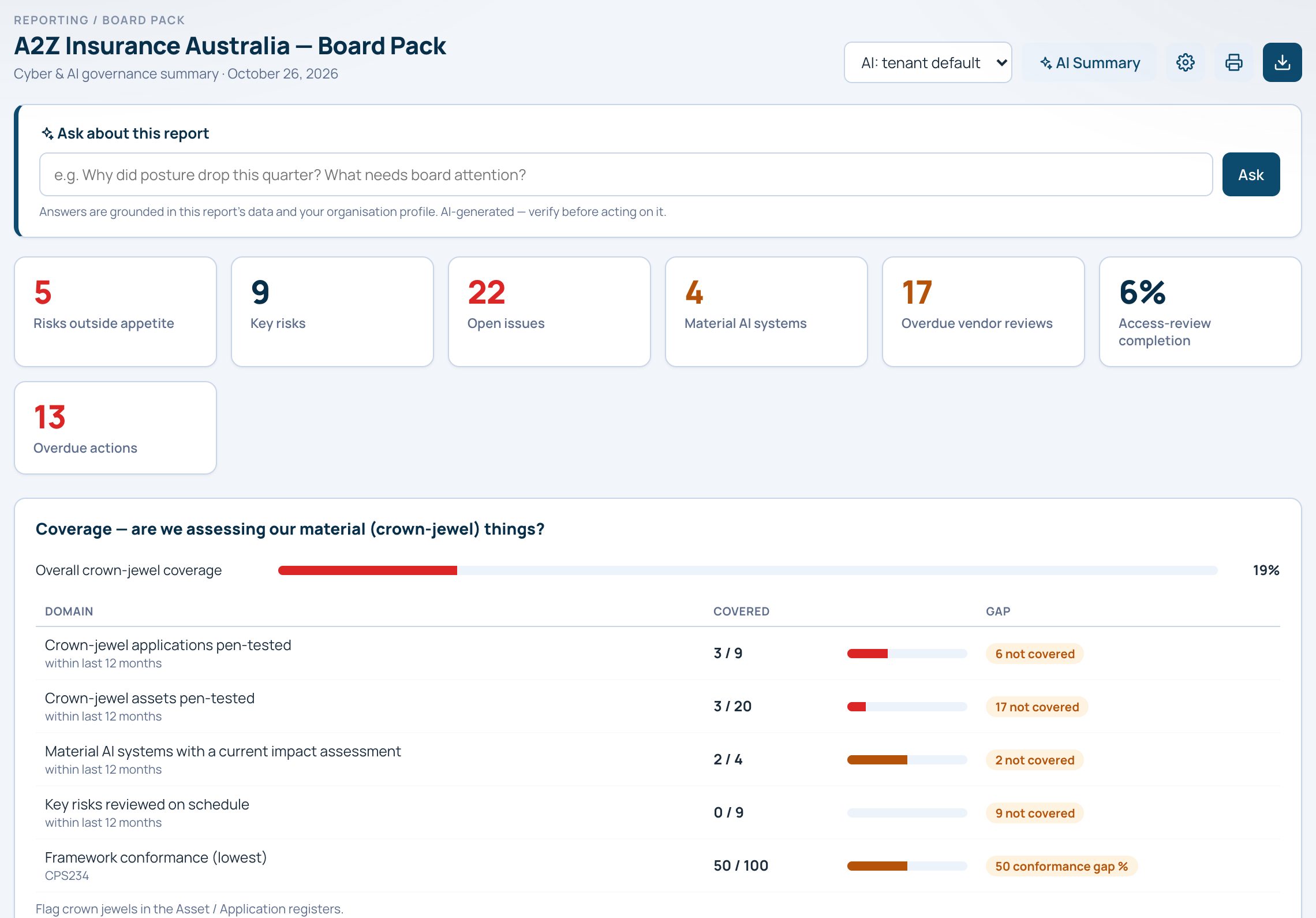
frinc board pack for a demo insurer: risks outside appetite, key risks, open issues, material AI systems, overdue vendor reviews and crown-jewel coverage by domain.
Scattered tools and spreadsheetsOne ordered record
From signals to one record

Connected, not collected.

Before: signals as they arrive

  • CPS234_evidence_FINAL_v3.xlsx
  • RE: backup attestation?
  • PTEST-002 report.pdf
  • supplier questionnaire (2024)
  • who owns AC-021?
  • board pack v7, slide 14
  • exception approved (verbal)
  • insurer wants MFA proof by Friday
  • ISO gap list (Sarah's copy)

After: one record, as at today sample data

  • AC-021MFA enforcement, proof on file for the insurerverified today
  • BK-004Backup immutability, evidence stale94 days
  • ST-002Pen-test findings, 3 open, 1 accepted with exception3 open
  • SM-011Supplier assurance, annual reviewverified 9d
  • RK-017Ransomware, residual above appetite, owner namedabove appetite

Every source, one place

Assessments, findings, risks, exceptions, actions, evidence and suppliers stay connected instead of collected.

Prove a control once

A control proven for one framework reads across the others it maps to, without re-testing it for every auditor.

Answer as at today

The board answer is the live record, not a slide assembled the night before. Ask it a question and it answers from your records.

The platform

Six jobs, one platform instead of a patchwork.

Each part below is a module in the same product, sharing one set of owners, controls and evidence.

  1. Assess
  2. Find gaps
  3. Raise risk or action
  4. Evidence closure
  5. Report as at today
  6. Reassess

AI-assisted reviews, with a person deciding.

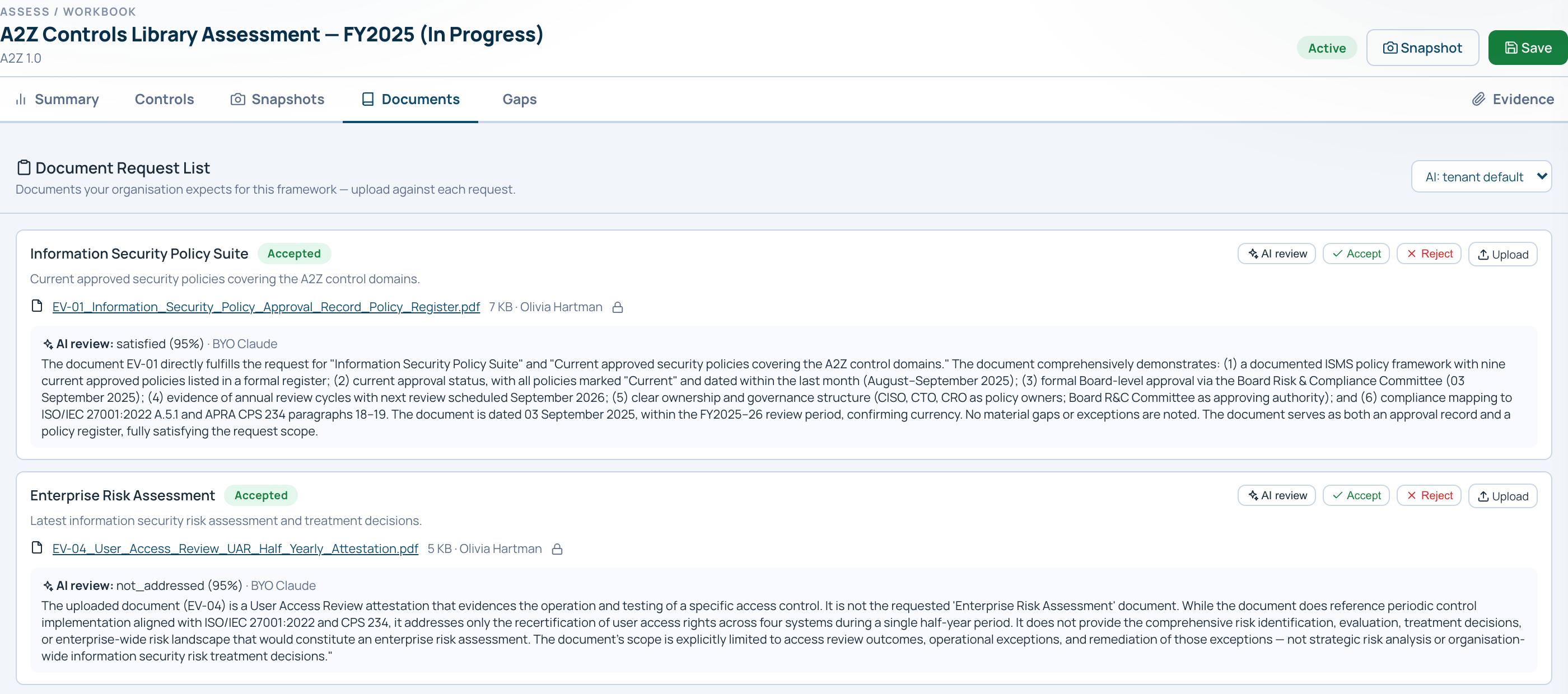
Assess against every framework you are held to in one workbook, and collect the documents each framework needs against every assessment.

  • One workbook per assessment: summary, controls, snapshots, documents and gaps.
  • Document requests set once per framework; every assessment starts a fresh round.
  • An optional AI reviewer reads each upload and gives a verdict, its confidence and its reasons. Advisory only: it never changes a status, your assessor accepts or rejects.
  • Results turn into a maturity heatmap, gap findings and a Now, Next, Later uplift roadmap.
Assessment workbook · Documents
Document request list in an assessment workbook: an uploaded policy register with an AI review of satisfied at 95 percent confidence, its reasoning, and Accept and Reject buttons.

Every register, one owner graph.

Risks, issues, exceptions, actions, assets, applications, suppliers and access reviews in one product, each record linked to the controls and people behind it.

  • Risks rated on a matrix your organisation defines, flagged when residual risk sits outside appetite.
  • Issues and exceptions with owners and dates; exceptions expire and approvals gate every acceptance.
  • Material assets and crown-jewel applications flagged, suppliers tiered by inherent risk, with questionnaires, contracts and fourth parties.
  • Access review campaigns with self-review protection, tracked revocations and an evidence pack for your auditors.
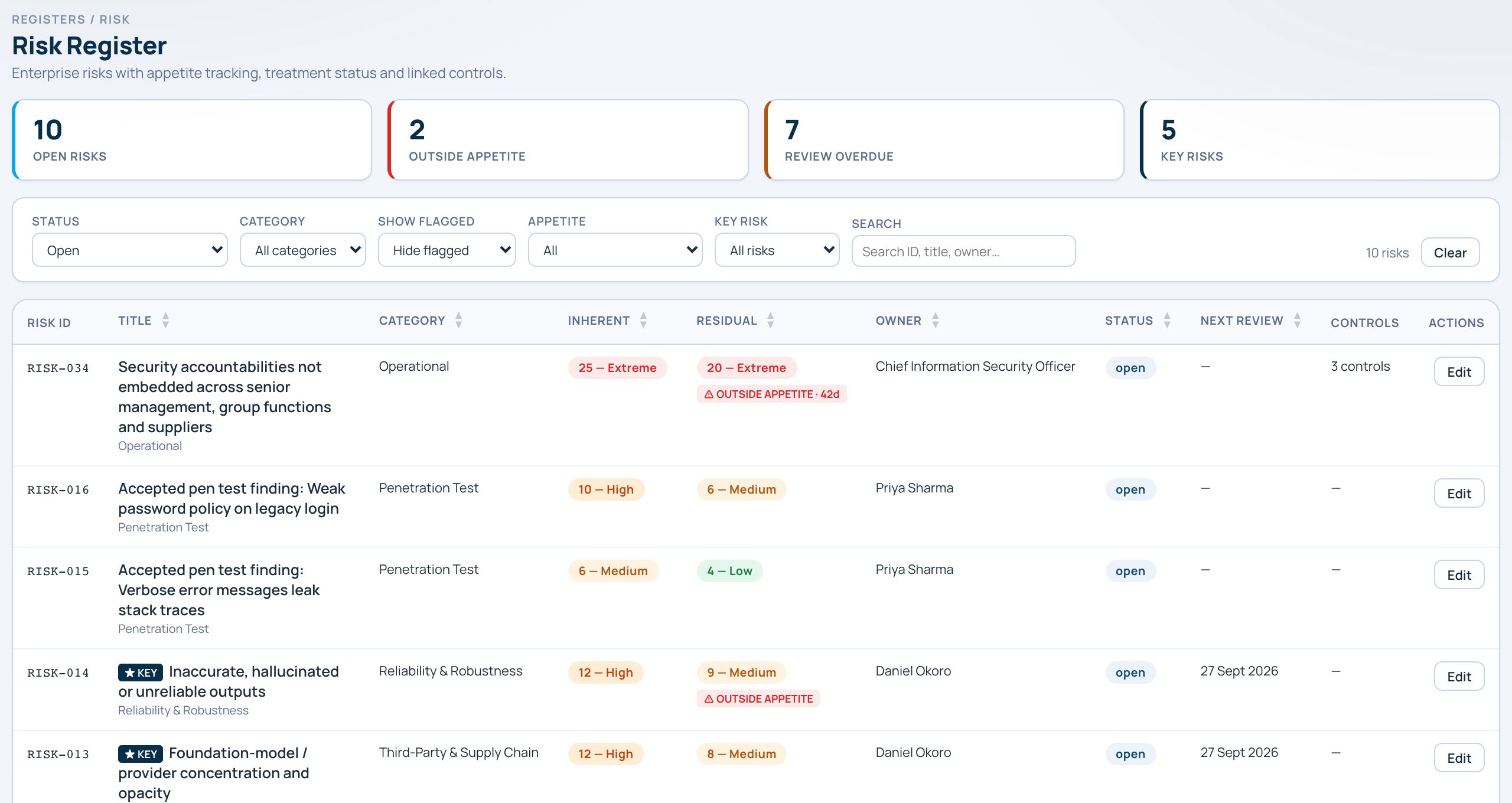
Risk register
Risk register filtered to open risks: inherent and residual ratings, an outside-appetite flag, key-risk badges, owners and review dates.

See what is exposed before someone else does.

Exposure management in one place: what your testers found, what the internet can see of you, and what attackers are talking about this week. Every finding lands in the same risk register as everything else.

  • Pen tests tracked from scoping to retest; accepted findings become a risk with a formal exception.
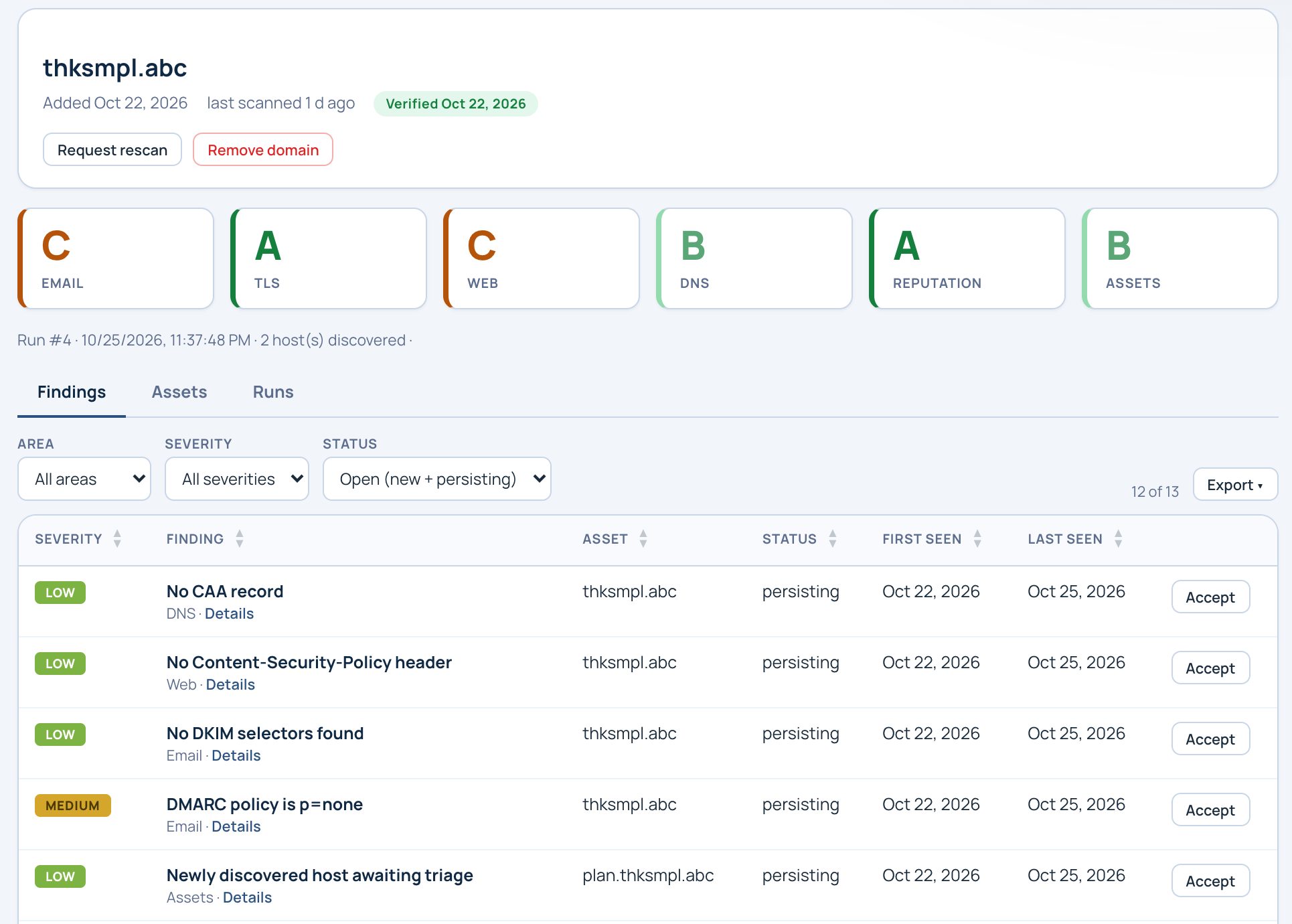
  • External posture: up to five of your domains, six graded areas, passive checks only, with a fix you can copy for every finding.
  • Threat intelligence summarised for your organisation and flagged when it names your suppliers, applications or assets.
  • Raise any finding or story as an issue, a risk or an action in one step.
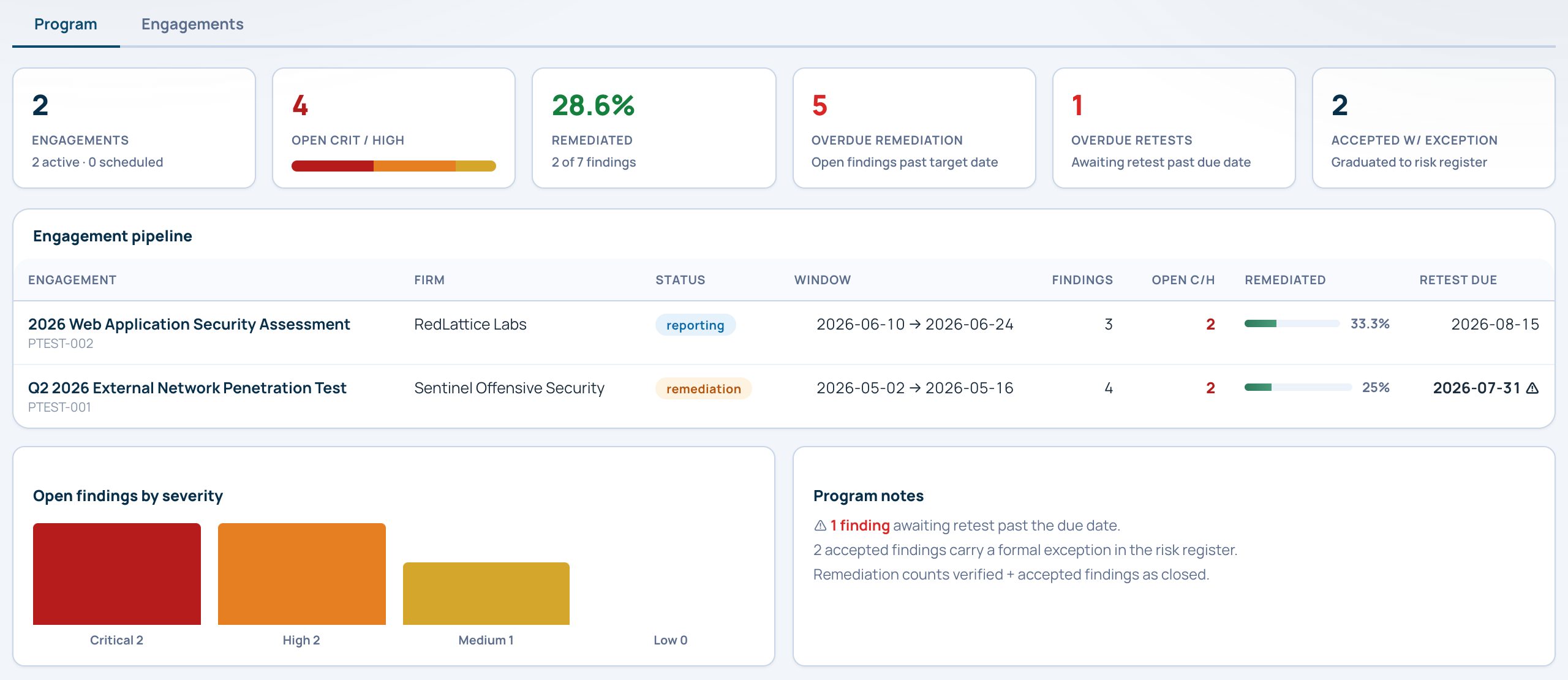
Pen tests · Program
Pen test programme view: open critical and high findings, percent remediated, overdue remediation and retests, an engagement pipeline and open findings by severity.
External posture
External posture view: graded areas for email, TLS, web, DNS, reputation and assets for a monitored domain.

Policy that maps to proof.

Keep the policy library, the how-to guides that put it into practice and the AI systems you are accountable for in one place.

  • Interactive policy maps: click from policy to standard to section to statement, with every statement mapped to the framework controls it satisfies.
  • Start from 415 baseline statements across 22 standards, adopt them and edit your own copy; export as PDF, Word or Excel.
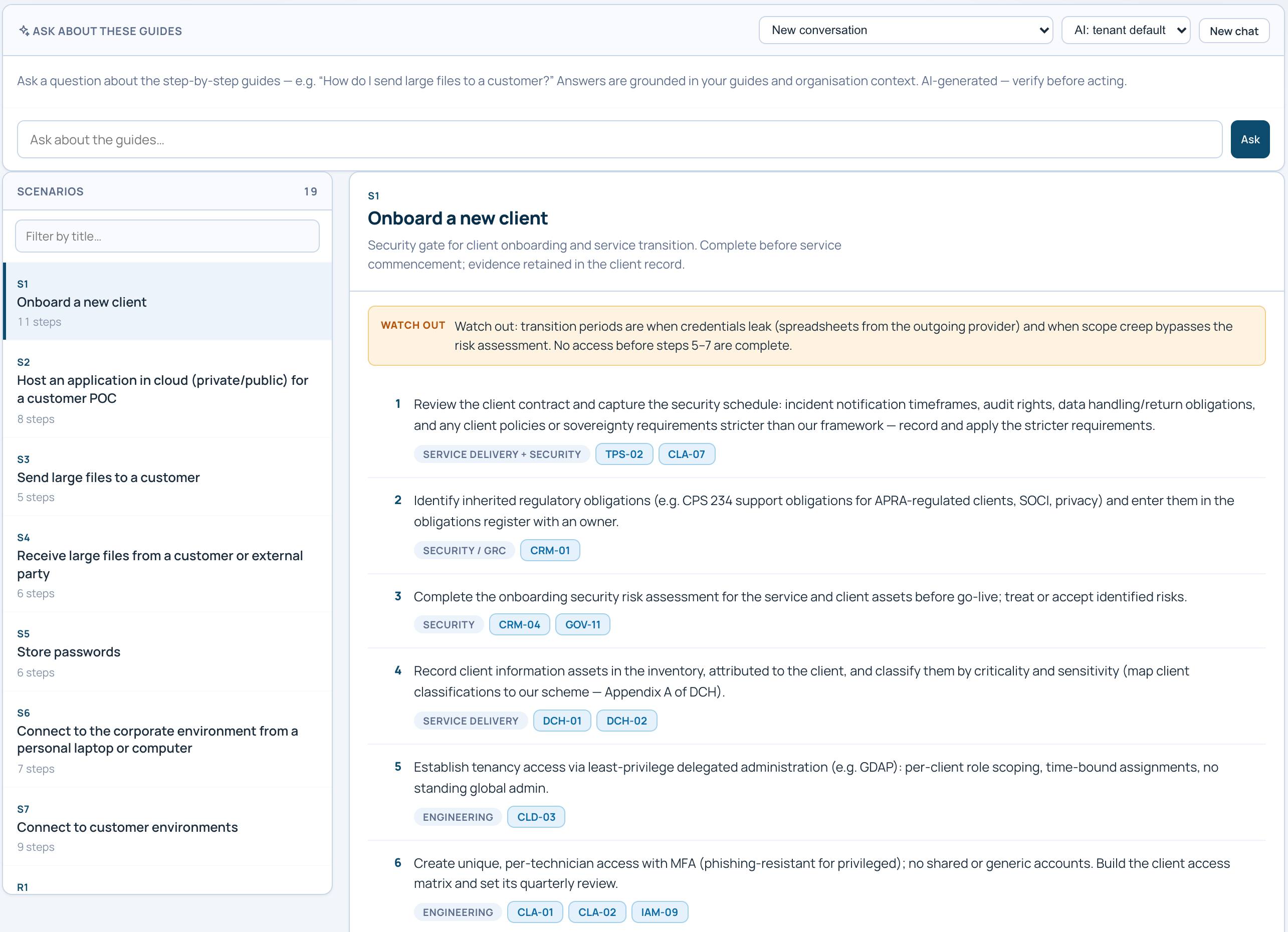
  • Scenarios: step-by-step how-to guides for common security situations, every step cited to the statement it comes from, with a chat assistant that answers from them.
  • An AI system register with accountable owners, models and providers, and impact assessments of who each system could harm.
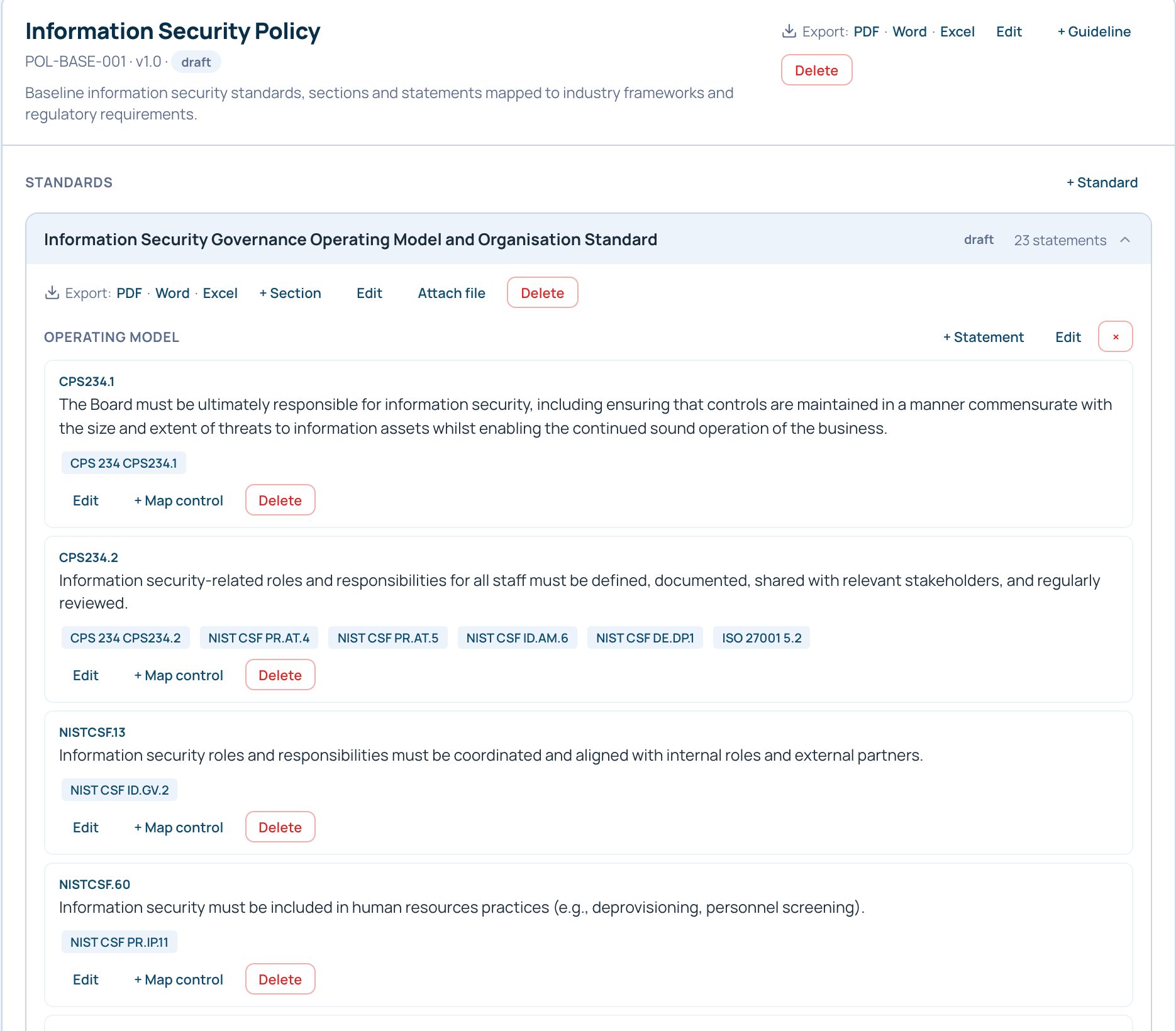
Policies & standards
Policy library: an information security policy open with its standards listed beneath it, each expandable to statements mapped to framework controls.
Scenarios
Scenario library: a step-by-step how-to guide with a watch-out note and numbered steps, each carrying citation chips to the statements it comes from.

The four questions a board asks.

Executive reporting reads from live records, not slides rebuilt the night before, and snapshots show how every number has moved.

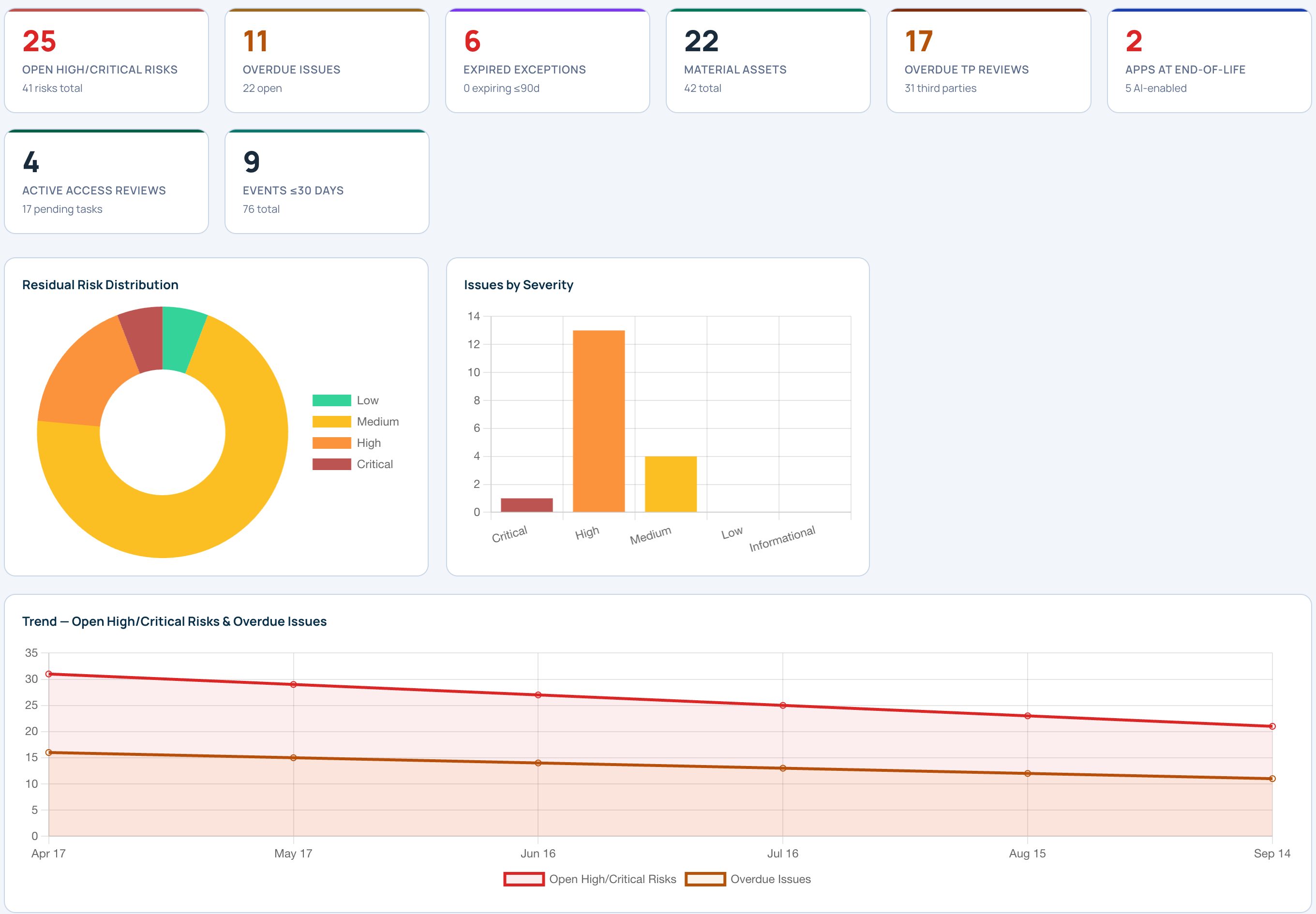
  • Metrics across every module, with trend lines drawn from the snapshots you capture.
  • Your own KPIs with targets and red, amber, green thresholds, or adopt from 188 ready-made metrics.
  • A board pack built on four questions: coverage, exposure, momentum and governance, with an AI summary you can question.
  • One search box finds any record, or ask in plain English and get the matching records with a short summary.
Reporting · Metrics
Metrics overview: headline KPI tiles across risks, issues, exceptions, assets, suppliers and access reviews, risk and issue distribution charts, and a six-month trend line of open high and critical risks and overdue issues.

Work that reaches the right person.

Day-to-day work runs in the same place as the risk it changes, so nothing moves without the right person seeing it.

  • Tasks assigned to named people, and approvals that must say yes before a risk acceptance or exception changes.
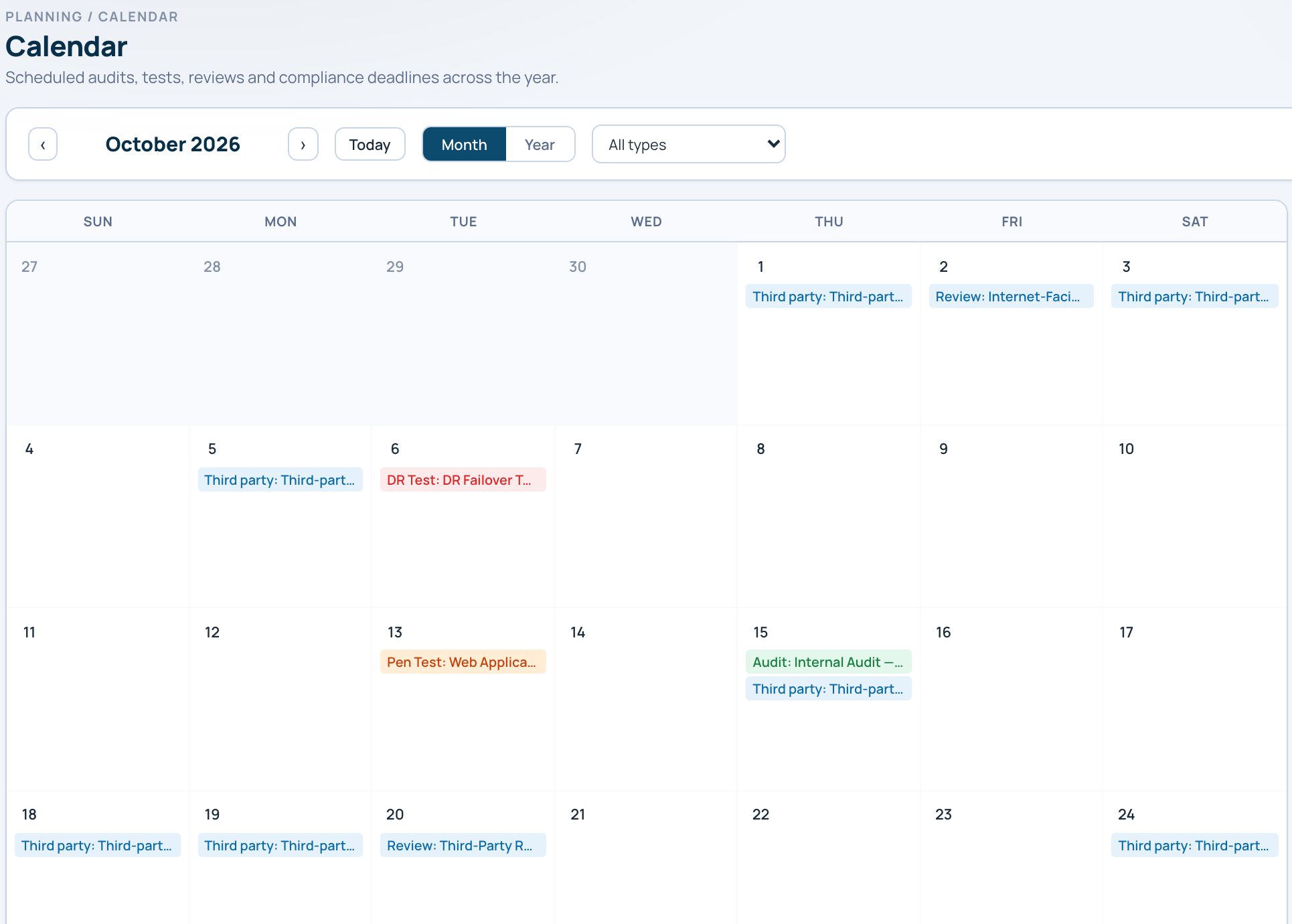
  • A compliance calendar for audits, pen tests, DR tests, reviews and deadlines.
  • A mobile home page with what needs attention and the how-to guides one tap away.
  • One admin console for users, sign-in rules and MFA, branding, AI and email settings, and backup and restore.
Compliance calendar
Compliance calendar month view with third-party reviews, a disaster recovery test, a pen test and an internal audit scheduled.

Why one platform

The record the board reads is the record the team works in.

As at

Every board pack is frozen when it is generated. The figure the board saw is the figure that stays on file.

The board's thresholds

Residual threshold, coverage window and review lead time are set per organisation, and the pack measures against them.

Plain words

A short summary above the numbers (signal, impact, ask), so a director reads the point before the chart.

Ask it

Ask the report a question in plain language and get an answer drawn from the risks, controls and evidence behind it.

Read across

Prove a control once and see conformance per framework, without re-testing it for every auditor.

Drill in

Every figure opens the register row behind it, read-only for executives.

Request early access

Quietly
in pilot.

We're onboarding a small group of pilot partners — regulated entities and agencies who want their governance to be one live record, not a reconstruction. Tell us who you are.

Request early access
Tell us who you are — we'll be in touch about pilot access.

We'll only use your details to contact you about pilot access. No password needed yet — we'll set that up together once you're approved.

Request received.

Thanks — your request is in the queue. We'll reach out once your access is approved.